
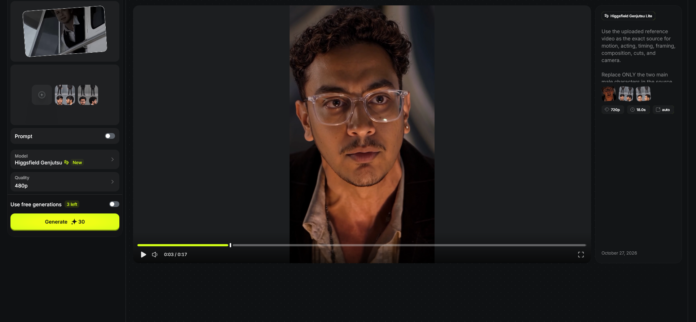
The Higgsfield Genjutsu Movie Scene Recreation Method Explained
AI video tools are now making it possible to take an existing movie scene, viral video, music video, commercial, dance clip, or cinematic sequence and replace the original characters with yourself, your friends, or custom characters.
Instead of trying to recreate complicated acting, camera movement and choreography from scratch, this method uses a much simpler approach:
Reference Video + Your Character References → AI Scene Recreation
The original video provides the acting, facial expressions, body movements, timing, camera movement, framing and overall scene structure.
Your character references tell the AI who should appear in the recreated version.
The goal is to make it look like your chosen characters were actually present when the original scene was filmed.
We tested this workflow using Higgsfield Genjutsu with multiple character references.
Here’s how to try it.
What You Need
You need three things:
1. Reference Video
Use the video clip whose scene, acting or motion you want to recreate.
This provides the:
- Body movement
- Facial performance
- Gestures
- Timing
- Choreography
- Camera movement
- Framing
- Composition
- Scene structure
You can use a movie-style scene, viral video, music video, dance clip, commercial, meme format or another video you want to recreate.
2. Photos of the Person You Want to Insert
Use a clear photograph of yourself or the person who will replace the original character.
For best results, use a photo with:
- Clear facial details
- Visible hairstyle
- Natural lighting
- Minimal blur
- Minimal filters
- Accurate skin tone
- Clear facial hair if present
The goal is to give the image model a strong identity reference.
3. One Character Reference Sheet Per Person
This is important.
If your video contains only one person you want to replace:
Create one Character Reference Sheet.
If your scene contains two people:
Create two separate Character Reference Sheets.
If your scene contains three people:
Create three separate Character Reference Sheets.
For example:
Character Reference 1 = You
Character Reference 2 = Your Friend
Character Reference 3 = Another Person
Do not put several different people into one reference sheet.
Each Character Reference should represent only one identity.
Universal Character Reference Image Prompt
Before opening Higgsfield Genjutsu, create a proper character reference sheet for every person you want to insert into the video.
Upload:
Your person’s photo + the reference video or an image of the original character they will replace.
Then copy this prompt:
Use the uploaded person/reference image as the exact identity reference.

Use the uploaded reference video or scene image as visual context.

The goal is to create a photorealistic CHARACTER REFERENCE SHEET of this person for replacing one specific character in the reference video.

IDENTITY:

Preserve the provided person's exact recognizable identity.

Maintain the same facial structure, eyes, nose, lips, jawline, skin tone, natural skin texture, hairstyle, hairline, facial hair, age, body proportions, and recognizable facial characteristics.

Do not beautify, redesign, stylize, age, de-age, or significantly alter the person's face.

The same exact identity must appear consistently in every view.

CHARACTER ROLE:

Analyze the reference video and identify the original character this person is intended to replace.

Adapt the provided person naturally to that character's role and appearance.

Recreate the original character's wardrobe from the reference video as accurately as possible, including clothing type, colors, materials, textures, fit, layering, accessories, footwear, visible damage, dirt, blood, sweat, wrinkles, wear, and scene-specific costume details.

Do NOT copy the original actor's face.

The uploaded person's identity must remain unchanged.

The reference video controls the costume and role.

The uploaded person controls the identity.

CHARACTER REFERENCE SHEET:

Create one clean 2x2 character reference sheet containing four views of the SAME person:

Top Left:
Full-body front or slight three-quarter view.

Top Right:
Full-body rear view.

Bottom Left:
Detailed front-facing facial close-up.

Bottom Right:
Detailed 90-degree side-profile facial close-up.

EXPRESSION:

Use a neutral, natural expression suitable for identity reference.

Do not copy an extreme expression from the source video.

The reference sheet should define the person's identity, not lock the final video into one facial expression.

CONSISTENCY:

Keep the exact same:
- identity
- face
- hairstyle
- facial hair
- skin tone
- body proportions
- costume
- accessories

across all four views.

IMAGE STYLE:

Photorealistic live-action photography.

Professional VFX / film-production character reference photography.

Neutral gray seamless studio background.

Soft, clean, even lighting.

Sharp facial detail.

Natural skin texture.

Realistic hair.

Realistic fabric texture.

Accurate human anatomy.

No text.

No labels.

No watermark.

No additional people.

FINAL REQUIREMENT:

The final image should look like a professional character reference sheet created specifically for AI video character replacement.

The provided person must remain unmistakably the same person.

The reference video should only determine the role, costume, and scene-specific appearance.
How to Create References for Multiple People
If you are recreating a scene with multiple characters, repeat the same image prompt separately for every replacement person.
For example:
Character Reference 1
Upload Person 1’s photograph and show the AI which original character Person 1 will replace.
Generate the reference sheet.
Character Reference 2
Upload Person 2’s photograph and show the AI which second original character Person 2 will replace.
Generate another separate reference sheet.
Character Reference 3
Repeat the process if another character needs to be replaced.
The important rule is:
One Person = One Character Reference Sheet
Do not create one reference sheet containing multiple different identities.
Full Higgsfield Genjutsu Scene Recreation Prompt
Once all your character references are ready, upload:
Reference Video → Character Reference 1 → Character Reference 2 → Additional Character References
Then copy the following prompt:
Use the uploaded reference video as the exact source for acting, performance, facial expressions, body movement, choreography, timing, camera movement, framing, composition, lighting, environment, and cinematography.

Replace ONLY the specified characters in the reference video with the provided Character References.

CHARACTER MAPPING:

Character Reference 1 must replace ONLY the first specified original character.

Character Reference 2 must replace ONLY the second specified original character if provided.

Character Reference 3 must replace ONLY the third specified original character if provided.

Continue the same one-to-one mapping for any additional provided Character References.

Each Character Reference must remain permanently assigned to its corresponding original character throughout the entire video.

Do not swap identities.

Do not merge faces.

Do not blend facial features.

Do not duplicate one reference across different characters unless specifically requested.

IDENTITY:

Transfer only the visual identity of each provided Character Reference.

Preserve each replacement person's exact facial identity, facial structure, hairstyle, hairline, skin tone, skin texture, facial hair, body proportions, and recognizable features.

Do not redesign or reinterpret their faces.

PERFORMANCE:

The reference video controls the performance.

Each replacement character must perform the exact same actions and acting as the original character they replace.

Preserve the original character's exact:

- facial expressions
- eye direction
- eye movement
- eyebrow movement
- blinking
- mouth movement
- lip movement
- jaw movement
- head movement
- body movement
- gestures
- posture
- reaction timing
- emotional intensity
- speaking rhythm
- choreography
- movement timing

Transfer the new character's identity only.

Do NOT transfer the static facial expression from the character reference image.

Do not neutralize, simplify, or restage the original performance.

WARDROBE:

Use the exact clothing and outfit design worn by the corresponding original character in the reference video.

Preserve clothing type, colors, materials, textures, patterns, proportions, folds, accessories, footwear, dirt, blood, damage, wear, and all other scene-specific costume details.

Adapt the original clothing naturally to the replacement character's body.

Do not redesign the wardrobe.

CAMERA AND SCENE:

Preserve the original video exactly.

Keep the same:
- camera angle
- camera position
- camera movement
- focal length
- lens perspective
- framing
- composition
- shot scale
- shot timing
- editing cuts
- depth of field
- environment
- background
- props
- lighting
- shadows
- reflections
- color grading
- scene geometry

Do not create new camera movement.

Do not crop, zoom, reframe, rotate, or create new shots.

Keep all people who are NOT specifically assigned for replacement unchanged.

TEMPORAL CONSISTENCY:

Maintain strong frame-to-frame consistency.

No identity drift.

No face swapping.

No face blending.

No hairstyle changes.

No facial-hair changes.

No wardrobe changes.

No flickering.

No disappearing characters.

No duplicated characters.

No warped anatomy.

No distorted hands.

No distorted faces.

FINAL REQUIREMENT:

The final video should look as though the provided Character References were physically present during the original filming.

Change ONLY the specified character identities.

Everything else must remain as close as possible to the original reference video.

The Character References control WHO the characters are.

The Reference Video controls HOW they move, act, react, and perform.
How to Use the Prompt
Upload your files in this order:
Reference Video → Character Reference 1 → Character Reference 2 → Additional References
Then paste the universal video prompt.
The most important part is the Character Mapping section.
Instead of leaving it as:
Character Reference 1 = first character
describe the original character clearly.
For example:
Character Reference 1 must replace ONLY the older male character wearing the dark jacket and white shirt.

Character Reference 2 must replace ONLY the younger male character wearing the black suit, white shirt, and tie.
For another video, it could be:
Character Reference 1 must replace ONLY the woman standing in the center wearing the red dress.

Character Reference 2 must replace ONLY the man standing on the right wearing the black jacket.
This gives the AI a clear visual clue about which character each reference belongs to.
Why Character References Matter
A simple text description such as:
“Young man with black hair wearing a suit”
does not provide enough information to reliably maintain someone’s identity throughout a moving video.
A Character Reference Sheet provides much more information about:
- Face
- Facial proportions
- Hairstyle
- Facial hair
- Skin tone
- Body shape
- Costume
- Side profile
- Rear appearance
This becomes even more important when the source video contains several camera angles.
The character may be seen from the front in one shot and from the side in another.
A proper multi-angle reference gives the AI more information about what the same person should look like from those different perspectives.
The Most Important Rule: Identity vs Performance
This is probably the most important part of the workflow.
Your character reference should control:
WHO
The reference video should control:
HOW
For example, imagine your reference photograph has a normal neutral expression.
But the original actor in the video is:
- Angry
- Shouting
- Laughing
- Crying
- Shocked
- Scared
You do not want the AI to copy the neutral expression from your photograph.
You want:
Your Identity + Original Actor’s Performance
That is why the universal video prompt specifically tells the model:
Transfer only the visual identity from the character reference.
and
Preserve the original actor’s facial expressions and performance.
Multiple Characters Need Separate References
If your scene contains two people, create:
Character Reference 1
and
Character Reference 2
If your scene contains three people:
Character Reference 1
Character Reference 2
Character Reference 3
Do not use one reference image containing all three replacement people.
Separate identity references make the character mapping much clearer.
For example:
Character Reference 1 = Original Character A

Character Reference 2 = Original Character B

Character Reference 3 = Original Character C
Then add:
Do not swap, merge, blend, or duplicate the identities.What About Clothing?
For movie-scene recreations, we generally recommend keeping the clothing worn by the original character.
Your face and identity change.
The movie costume remains.
This can make the result feel more like you were originally cast in the scene.
For example, if the original character wears:
- Formal suit
- Armor
- Historical clothing
- Uniform
- Superhero costume
- Blood-stained clothing
- Damaged clothing
your replacement character inherits that costume.
The reference-image prompt can also recreate that costume in your character sheet so the model has another visual reference.
What If You Want to Remove a Hat or Helmet?
Sometimes the original character has headwear but you want your real hairstyle visible.
Simply add this line to the Character Reference Image Prompt:
Remove the original character's hat, helmet, hood, cap, crown, or other headwear.

Keep the provided person's natural hairstyle, hairline, head shape, and facial identity clearly visible.
You do not need another full prompt.
Tips for Better Results
AI video models can still struggle with complicated scenes, particularly when several people, fast movement, extreme facial expressions, hands, occlusion, or rapid camera cuts are involved.
A few things can improve your chances:
Use Clear Character Photos
Avoid extremely blurry, filtered or heavily edited photographs.
Keep Each Identity Separate
Create one character reference sheet per person.
Clearly Describe Who Replaces Whom
Do not rely only on:
Character 1
Instead use:
“the man wearing the black suit standing on the left.”
Let the Video Control the Acting
Do not try to recreate every facial expression inside your character reference sheet.
Keep the reference face relatively neutral.
Keep the Prompt Focused
Do not unnecessarily redesign the environment, camera, lighting and wardrobe if your goal is simply to replace the actors.
The fewer unrelated things you change, the easier it is for the model to understand the goal.
The Basic Formula
The useful part of this workflow is that it is not limited to one specific movie or trend.
You can use the same method for many different reference-video transformations:
Original Video
Your Character Reference
Additional Character References
Character Mapping
=
Your AI Scene Recreation
The key concept is:
Character Reference = WHO
Reference Video = HOW
Once you have good Character Reference images, you can reuse the same basic workflow for different scenes.
What Can You Recreate?
This method can be experimented with using:
- Movie scenes
- TV scenes
- Viral Reels
- TikTok trends
- Music videos
- Dance videos
- Commercials
- Cinematic videos
- Memes
- Action sequences
- Dialogue scenes
- Historical scenes
- Superhero-style scenes
- Short films
The source video changes.
The workflow stays almost the same.
Important Note
This tutorial is intended for creative experimentation and educational purposes.
Movie scenes, music videos, TV footage, choreography, music, characters, performances and other copyrighted material belong to their respective rights holders.
If you publish a recreation, clearly present it as an AI recreation, parody, fan experiment, or creative demonstration where appropriate rather than implying that your version is an official production.
Also avoid using another real person’s likeness deceptively or in ways that falsely suggest they participated in something they did not.
Want more viral AI prompts and workflows?
Follow @botgadgets for practical AI tools, prompts and creative workflows.
Bookmark this page – we’ll update the workflow as AI video tools continue to improve.