
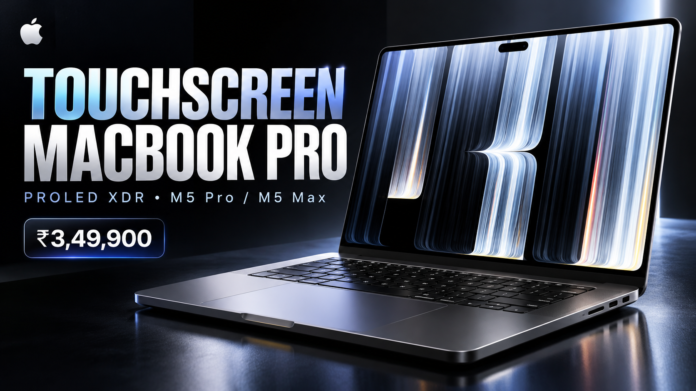
Apple has given the MacBook Pro one of its biggest display upgrades in years.
The new MacBook Pro with PROLED XDR Display adds direct Multi-Touch support, tandem OLED technology, Dynamic Island and Apple’s M5 Pro and M5 Max chips.
It comes in 14-inch and 16-inch sizes, with prices in India starting at ₹3,49,900. Apple says the new models will be available from November 9, 2026.
The touchscreen will probably get most of the attention, but there is quite a lot more going on here.
Quick answer
The 2026 MacBook Pro with PROLED XDR Display is Apple’s new high-end professional laptop with a tandem-OLED touchscreen, Dynamic Island, 10Hz–120Hz ProMotion and M5 Pro or M5 Max processors.
The 14-inch model starts at ₹3,49,900 in India, while the 16-inch version starts at ₹4,09,900. M5 Max configurations start at ₹5,49,900.
Touch finally comes to the MacBook Pro
The biggest change is easy to understand: you can now touch the screen.
Apple lists full Multi-Touch gesture support on both the 14.2-inch and 16.3-inch PROLED XDR displays.
That means users can interact directly with content instead of relying only on the trackpad.
Apple’s own demonstrations show people using gestures such as tapping, dragging and pinching directly on the screen while working in professional applications.
The traditional MacBook controls are still here. You still get the keyboard, Touch ID and Force Touch trackpad, so Apple is adding Touch as another input method rather than replacing the existing Mac workflow.
That is probably the sensible approach.
A video editor may still prefer keyboard shortcuts for most tasks, while a designer or developer could use the screen directly when it is faster.
PROLED XDR uses tandem OLED
The touchscreen is only part of the display story.
Apple has moved the high-end MacBook Pro to a tandem-OLED panel.
The 14-inch model has a 14.2-inch display with a resolution of 3024 × 1986, while the larger model uses a 16.3-inch panel with a 3472 × 2266 resolution.
Both have a pixel density of 254 pixels per inch.
Apple lists:
- Up to 2,000 nits peak HDR brightness
- Up to 2,000 nits peak outdoor SDR brightness
- 1,000 nits sustained full-screen brightness
- 10,000,000:1 contrast ratio
- P3 and Adobe RGB wide colour gamuts
- 1 billion colours
- True Tone
- 10Hz to 120Hz ProMotion
- Optional nano-texture glass
OLED should also give the display much deeper blacks than a conventional backlit LCD because individual pixels can turn themselves off.
For photographers, designers and video professionals, the addition of Adobe RGB support is also worth noting.
Dynamic Island replaces the old display cutout
Another obvious visual change is at the top of the screen.
The new MacBook Pro uses Dynamic Island around the camera area rather than treating the cutout as an unused part of the display. Apple lists Dynamic Island as part of the PROLED XDR display specification.
It also gives this generation a clear visual difference from older MacBook Pros.
Whether Dynamic Island becomes genuinely useful on a laptop will depend on how Apple and third-party developers use it over time.
M5 Pro and M5 Max
Inside, buyers can choose between M5 Pro and M5 Max.
There are several configurations rather than one fixed version.
M5 Pro
Apple offers M5 Pro configurations with:
- 15-core or 18-core CPU
- Up to a 20-core GPU
- 16-core Neural Engine
- Neural Accelerators
- Hardware-accelerated ray tracing
- Up to 307GB/s memory bandwidth
M5 Max
M5 Max goes considerably further.
The highest configuration includes:
- 18-core CPU
- Up to a 40-core GPU
- 16-core Neural Engine
- Neural Accelerators
- Hardware-accelerated ray tracing
- Up to 614GB/s memory bandwidth
For people working with large video projects, 3D rendering, software development or local AI workloads, the M5 Max configurations are where the more extreme specifications begin.
Up to 128GB RAM and 16TB SSD
Memory and storage options also go well beyond what most laptop users will need.
The highest M5 Max configuration supports up to 128GB of unified memory.
Storage can go all the way to a 16TB SSD on M5 Max models.
M5 Pro models support up to 64GB of unified memory depending on the selected configuration and up to 4TB of storage.
Those numbers are workstation territory, although configuring a MacBook Pro anywhere near the maximum will obviously push the final price far above the starting figure.
Apple is pushing local AI performance too
Apple is also positioning the new MacBook Pro as a machine for AI workloads.
The M5 Pro and M5 Max include Neural Accelerators alongside the 16-core Neural Engine, and the high-end models have large amounts of unified memory available to the CPU and GPU.
That memory architecture can be useful for people experimenting with larger local AI models, where available GPU memory is often one of the biggest limitations.
It does not mean every AI application suddenly runs locally or that every model will perform well.
Actual results will depend on the model, software and MacBook configuration.
But a laptop offering up to 128GB of unified memory is certainly interesting for developers working with local AI tools.
Apple kept the useful ports
Thankfully, Apple has not removed the professional connectivity to make the chassis look cleaner.
The MacBook Pro includes:
- Three Thunderbolt 5 USB-C ports
- HDMI
- SDXC card slot
- MagSafe 3
- 3.5mm headphone jack
Thunderbolt 5 supports speeds of up to 120Gbps on these models.
On the left side you get MagSafe 3, two Thunderbolt 5 ports and the headphone jack.
The right side has SDXC, another Thunderbolt 5 port and HDMI.
That is a much more useful arrangement for photographers, editors and other professional users than forcing everything through USB-C dongles.
It can drive a lot of external displays
External display support depends on which chip you choose.
M5 Pro supports up to three external displays, while M5 Max can support up to four external displays, depending on resolution and refresh rate.
Apple also lists support for combinations reaching 8K resolution and high-refresh-rate 4K displays.
That should matter particularly for desktop setups where the MacBook Pro spends much of its time connected to multiple monitors.
Battery life reaches 24 hours
The headline battery figure is up to 24 hours, although that applies to specific configurations and workloads.
For example, Apple rates the 16-inch M5 Pro model for up to:
- 24 hours of video streaming
- 17 hours of wireless web use
The 14-inch M5 Pro is rated for up to 22 hours of video streaming.
Expect significantly lower numbers when doing demanding work such as rendering, compiling software or running intensive AI models.
14-inch vs 16-inch MacBook Pro
The two sizes share most of the important features, but there are differences in dimensions, battery capacity and portability.
14-inch
- 14.2-inch display
- 1.50cm thick
- Starts at 1.38kg
- Up to 22 hours video streaming with M5 Pro
16-inch
- 16.3-inch display
- 1.60cm thick
- Starts at 1.82kg
- Up to 24 hours video streaming with M5 Pro
The 14-inch is the obvious choice for portability.
The 16-inch gives you more screen space and the best battery figure, but it is considerably larger and heavier.
MacBook Pro PROLED XDR India price
Apple has confirmed the following starting prices:
| Model | India starting price |
|---|---|
| 14-inch MacBook Pro M5 Pro | ₹3,49,900 |
| 16-inch MacBook Pro M5 Pro | ₹4,09,900 |
| 14-inch MacBook Pro M5 Max | ₹5,49,900 |
| 16-inch MacBook Pro M5 Max | ₹5,89,900 |
Apple also offers education pricing for eligible buyers.
Pre-orders opened on October 28, and availability begins on November 9, 2026.
Is a touchscreen MacBook actually useful?
That is probably the more interesting question than whether Apple could make one.
Windows laptops have had touchscreens for years, and plenty of people barely use them.
Simply adding Touch does not automatically make a laptop better.
What matters is whether macOS applications actually take advantage of it.
Apple keeping the Force Touch trackpad is a good sign because users are not being forced into a touch-first interface.
There are situations where reaching up and touching something on screen may be faster. There are others where a mouse or trackpad remains considerably more comfortable.
Creative applications could be where Touch becomes most interesting.
Timeline controls, virtual instruments, visual design tools, 3D objects and certain development interfaces all have interactions that could benefit from direct manipulation.
We will need to see how quickly developers adapt their Mac apps before judging how important Touch really becomes.
Who should consider buying it?
The PROLED XDR MacBook Pro makes the most sense for people who already need professional Mac hardware.
Video editors and photographers get the OLED display, very high brightness and wide colour support.
Developers get M5 Pro or M5 Max performance and large unified-memory configurations.
People working with local AI models may find the 64GB and 128GB memory options particularly interesting.
And creators who spend hours working directly with visual interfaces may find Touch useful.
For someone mainly browsing the web, watching videos or using office applications, however, spending ₹3,49,900 or more simply to get a touchscreen MacBook would be difficult to justify.
Our take
This feels like a more important MacBook Pro update than another routine chip upgrade.
The new processor matters, but the changes people will notice immediately are the display, Touch and Dynamic Island.
The biggest unknown is software.
If developers build genuinely useful touch interactions into professional Mac applications, direct Touch could become something MacBook users quickly get used to.
If most apps continue behaving exactly as they do today, plenty of owners may end up using the trackpad 95% of the time.
Either way, Apple has changed a part of the MacBook experience that stayed largely untouched for years.
At ₹3,49,900, this is clearly not aimed at casual laptop buyers. But for professionals already shopping at the high end of the MacBook range, the PROLED XDR models are much more interesting than a simple processor refresh.
Frequently Asked Questions
Does the new MacBook Pro have a touchscreen?
Yes. The MacBook Pro with PROLED XDR Display supports Multi-Touch gestures directly on the display.
What is PROLED XDR?
PROLED XDR is Apple’s tandem-OLED display used in the new high-end MacBook Pro. It supports up to 2,000 nits peak brightness, a 10,000,000:1 contrast ratio and ProMotion up to 120Hz.
Does the MacBook Pro have Dynamic Island?
Yes. Dynamic Island is integrated into the PROLED XDR display design.
Which processors are available?
The new models are available with Apple M5 Pro or M5 Max chips.
What is the MacBook Pro 2026 price in India?
The 14-inch M5 Pro version starts at ₹3,49,900. The 16-inch M5 Pro starts at ₹4,09,900. M5 Max versions start at ₹5,49,900.
When will the new MacBook Pro launch in India?
Apple says the MacBook Pro with PROLED XDR Display will be available from November 9, 2026.
How much RAM can the new MacBook Pro have?
M5 Max configurations can be configured with up to 128GB of unified memory.
How much storage is available?
Storage ranges from 1TB on some M5 Pro configurations up to 16TB on M5 Max models.